 Speaklna
Free · Coming soon to the Mac App Store
Copy text. Press ⌥T. Listen.
Speaklna reads whatever is on your clipboard aloud, in natural Mandarin Chinese, right on your Mac. Press ⌥S to stop. No account, no internet connection, nothing collected.
- Free
- No ads, no in-app purchases, no account.
- On your Mac
- The speech model is inside the app. Speaklna has no internet access.
- ⌥T · ⌥S
- Read the clipboard, or stop, from any app.
How it works.
Copy
Select Chinese text anywhere — a web page, an email, a PDF — and copy it with ⌘C.
Press ⌥T
Speaklna starts reading, and a small cue at the bottom of the screen tells you what it is doing. Long text plays sentence by sentence while the rest is prepared, so you never wait for the whole thing.
Press ⌥S to stop
Or press ⌥T again while it is reading to start over with whatever is on the clipboard now.
Made for reading Chinese aloud.
Speaklna is built for Mandarin Chinese, including the English words and abbreviations that turn up in everyday Chinese text.
Natural Mandarin
Chinese mixed with English words and abbreviations is read naturally. Traditional and Simplified characters are both read in standard Mandarin. Line breaks copied from PDFs are joined back up, and links are read as just the site name.
Four voices, or your own
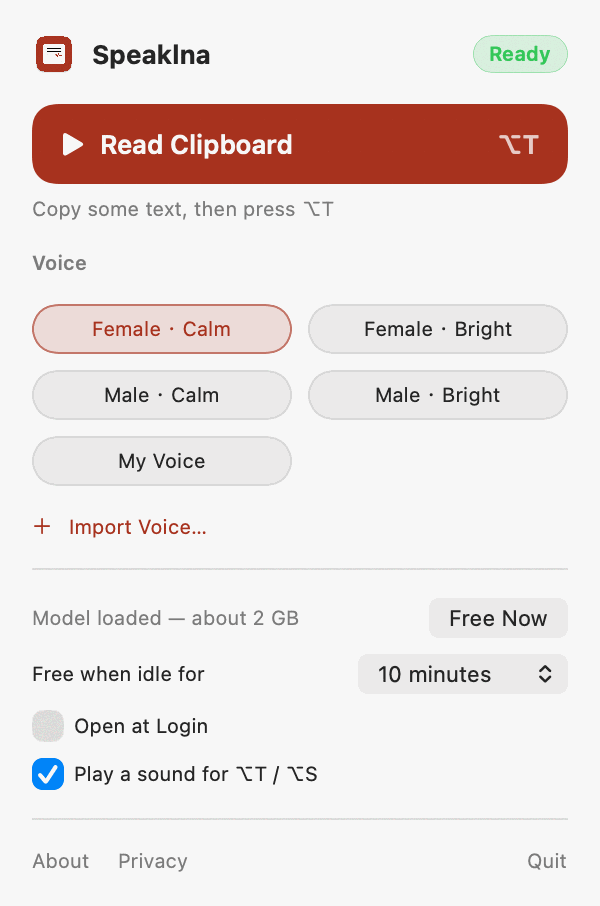
Choose from four built-in voices: female or male, calm or bright. Or import a recording of any length, pick up to 10 seconds of it on the waveform, and make it a voice. Only import your own voice or one you have permission to use.
Nothing leaves your Mac
The speech model runs on your Mac’s Apple silicon. The app is not allowed to use the network, has no account and collects nothing. Imported voices are stored only in the app’s own storage on your Mac.
Stays out of the way
Speaklna lives in the menu bar and the Dock. After sitting idle for as long as you choose, it frees the roughly 2 GB of memory the model uses, and loads it again the next time you press ⌥T.
What you need.
- A Mac with Apple silicon (M1 or later)
- macOS 15.2 or later
- 16 GB of memory recommended. It works with 8 GB, but may be slow.
- About 2 GB of disk space. The speech model is built in, so Speaklna never downloads anything.
Support.
Why does the first read take a few seconds?
That is the model loading. Speaklna frees its memory after sitting idle, so the first ⌥T after that needs a few seconds to get ready (the cue shows Preparing). To keep it ready, click Load Now in the panel, or set Free when idle for to Keep loaded.
macOS asks whether Speaklna can paste from other apps.
That is the clipboard read that ⌥T triggers. Allow it, or Speaklna cannot see the text you copied.
How do I delete a voice I imported?
Open the panel, Control-click (or right-click) the voice, and choose Delete This Voice. Deleting the app removes every imported voice too.
Does it read English?
Speaklna is built for Chinese and reads the English words inside Chinese text well. Text that is entirely English can be read, but it is not what Speaklna is tuned for.